Send the scores to Dependency-Track
Who this is for: teams who already run Dependency-Track and want the contextual scores where they audit, not only in a file. By the end of this page: every finding in your project carries the OWASP vector and score Vens computed, with an audit trail showing where it came from.
Two prerequisites
Dependency-Track 5.1.0 or later. Applying an OWASP rating from a VEX import landed in 5.1.0. Earlier versions ingest the file and ignore the ratings.
Its Trivy analyzer, enabled. Both sides then share one vulnerability database, and the CVE sets line up by construction. Dependency-Track has no Grype analyzer, so this is the only supported pairing today.
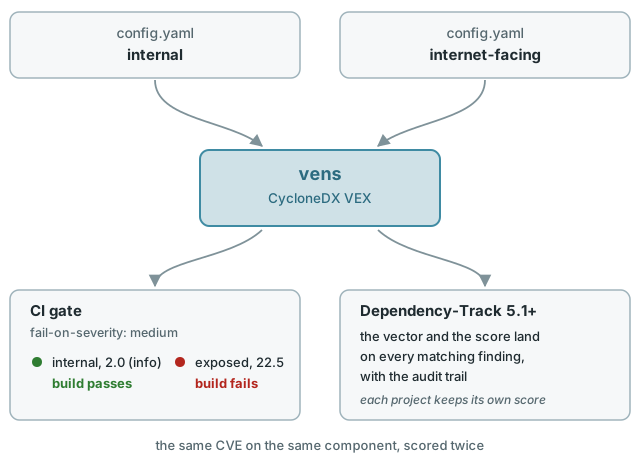
What this does, and what it does not
Vens writes its score into the ratings block of the VEX, using the OWASP method. On import, Dependency-Track copies that vector and score onto the matching findings and records the change in their audit trail.
It annotates findings that already exist, it does not create them. Dependency-Track matches on the vulnerability id alone, so the finding has to be there first.
The rating is stored per finding, so the same CVE on the same component can carry a different score in two projects. That is the point: one is internet-facing, the other is not.
Before you start
export DT_URL=https://dtrack.example.com
export DT_API_KEY=...                        # allowed to create projects and upload BOMs
export TRIVY_URL=http://trivy.internal:4954  # reachable from Dependency-Track and from your CI
export TRIVY_TOKEN=...                       # you pick it, both sides use it
Step 1 — Point Dependency-Track at a Trivy server
Once per instance. Run Trivy in server mode somewhere your instance can reach:
Store the token, then enable the analyzer. From the UI this is under Administration, or over the API:
curl -X POST "$DT_URL/api/v2/secrets" \
  -H "X-Api-Key: $DT_API_KEY" -H "Content-Type: application/json" \
  -d "{\"name\":\"trivy-token\",\"value\":\"$TRIVY_TOKEN\"}"

curl -X PUT "$DT_URL/api/v2/extension-points/vuln-analyzer/extensions/trivy/config" \
  -H "X-Api-Key: $DT_API_KEY" -H "Content-Type: application/json" \
  -d "{\"config\":{\"enabled\":true,\"apiUrl\":\"$TRIVY_URL\",\"apiToken\":\"trivy-token\",\"scanOs\":true,\"scanLibrary\":true,\"ignoreUnfixed\":false}}"
Tip
scanOs is off by default, which limits Dependency-Track to your application dependencies. On a base image most components are OS packages, so leaving it off hides most of the findings.
Step 2 — Upload the SBOM
trivy image my-app:v1.2.3 --format cyclonedx --output sbom.cdx.json

PROJECT=$(curl -s -X POST "$DT_URL/api/v1/bom" \
  -H "X-Api-Key: $DT_API_KEY" \
  -F "projectName=my-app" \
  -F "projectVersion=internet-facing" \
  -F "autoCreate=true" \
  -F "bom=@sbom.cdx.json" | jq -r .projectUuid)
The analysis is asynchronous. Wait until the findings show up:
Tip
Create one project version per deployment context. Two versions of the same app, internal and internet-facing, is what lets you compare the two scores side by side.
Step 3 — Match the same SBOM against the same server
Reuse the file from step 2 rather than reading the image again, and point at the server Dependency-Track just used, not your local database:
trivy sbom sbom.cdx.json \
  --server "$TRIVY_URL" --token "$TRIVY_TOKEN" \
  --format json --output report.json
The image is analysed once, in step 2. This call only does the matching, against the same database Dependency-Track matched against, which is what keeps the two sides aligned. Use your own database instead and they drift apart as soon as the two runs are separated in time or in version, and part of the VEX then annotates nothing.
Step 4 — Generate the VEX
Use the config.yaml that describes that context. See Describe your context.
vens generate \
  --config-file .vens/internet-facing.yaml \
  --sbom-serial-number "$(jq -r .serialNumber sbom.cdx.json)" \
  report.json \
  vex.cdx.json
--sbom-serial-number is required by Vens so the BOM-Links resolve back to the SBOM. Dependency-Track does not read it: it matches on the vulnerability id.
Keep the VEX at CycloneDX 1.6
That is the default. A 1.7 document is rejected as an unrecognized spec version by every released Dependency-Track. See --cyclonedx-spec-version.
Step 5 — Apply the VEX
From the UI: open the project, then Apply VEX. From the API:
curl -X POST "$DT_URL/api/v1/vex" \
  -H "X-Api-Key: $DT_API_KEY" \
  -F "project=$PROJECT" \
  -F "vex=@vex.cdx.json"
Importing again overwrites the previous values, so a scheduled run keeps the scores current.
Step 6 — Look at a finding
Open the project, go to Audit Vulnerabilities, and select a finding. The audit trail carries the change, commented CycloneDX VEX:
OWASP Vector: (None) → SL:5/M:5/O:5/S:5/ED:4/EE:4/A:4/ID:5/LC:5/LI:5/LAV:5/LAC:5/FD:5/RD:5/NC:5/PV:5
OWASP Score:  (None) → 22.5
Over the API, GET /api/v1/finding/project/$PROJECT returns the vector and the score on every finding at once. Vens emits a single score, so the likelihood, technical and business fields all carry the same number.
Known limits
- Ranking still follows CVSS. Dependency-Track stores and displays the OWASP score, but severity, the findings list and the dashboards are still driven by CVSS. Two projects with very different contextual scores show the same severity breakdown.
- The 16-factor panel is not on the finding. Dependency-Track's OWASP Risk Rating panel lives on the global vulnerability page and reads that vulnerability's own vector, which a VEX import does not touch.
- The scores come from an LLM. They are a ranking aid, not a verdict. See Limitations, and pass
--attestto keep the per-CVE reasoning as audit evidence.